darktable does Lightroom's job and bills nobody
darktable is a non-destructive raw workflow with a module list longer than most paid converters and a learning curve to match.
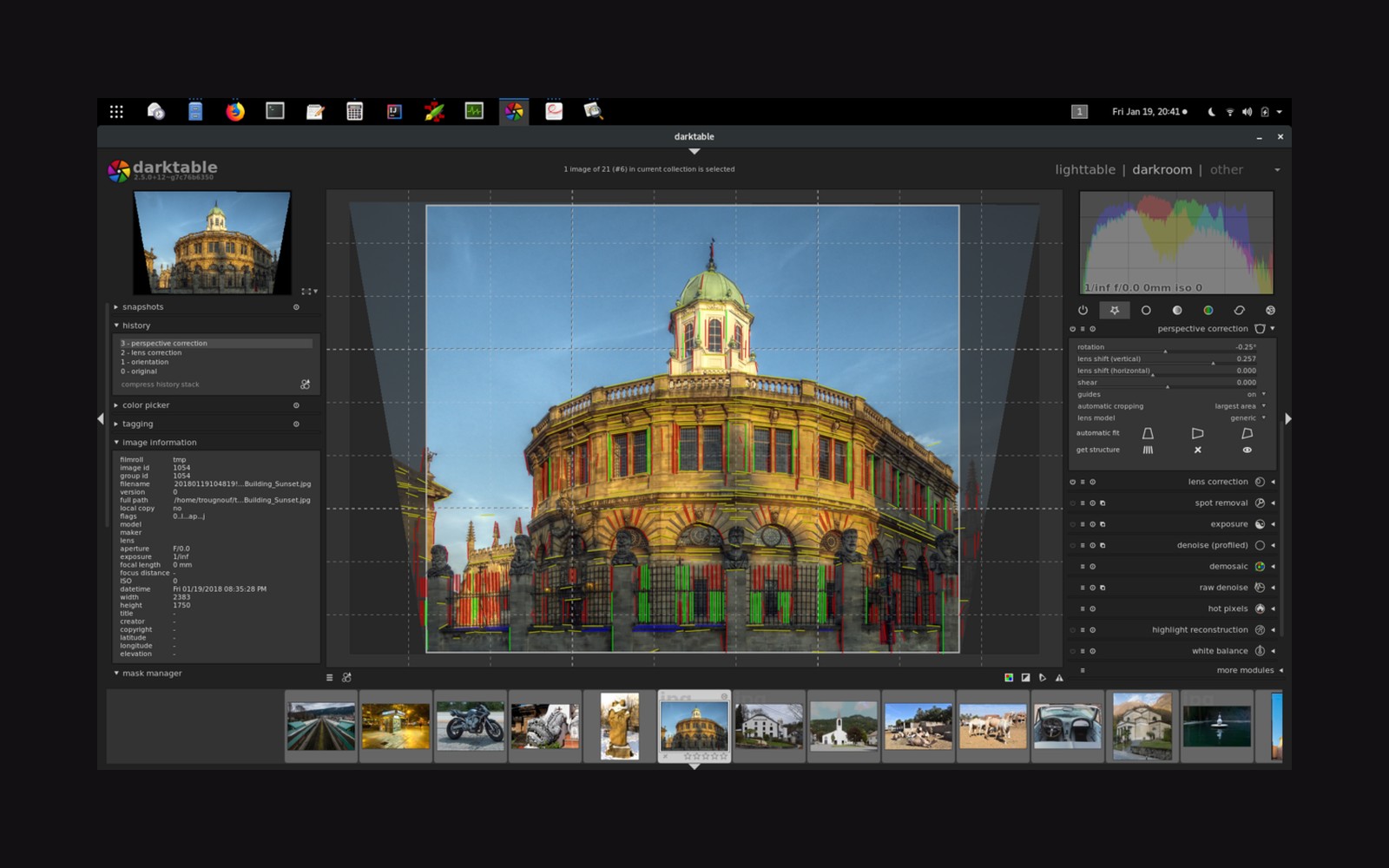
darktable does the same job as the expensive ones
darktable is free, open-source, and runs on Linux, macOS, and Windows. It is a non-destructive raw workflow application — every edit is stored as instructions, the original file is never touched — with a module list that runs to more than eighty processing steps, organized into a pipeline that processes each image from sensor data to output colour space in a fixed, deliberate order. Phase One charges four figures for Capture One Pro (perpetual licence priced at $299 as of mid-2025 on the maker's own site); darktable charges nothing and does not ask for an email address.
The comparison is not flattery. darktable handles raw files from hundreds of cameras, including Fujifilm's X-Trans sensor layout, which trips up several paid converters. Its colour science is grounded in actual photometry: the default pipeline introduced with version 3.0 routes images through a scene-referred workflow, keeping values in a linear light space — meaning the numbers in the file stay proportional to the light that hit the sensor — for as long as possible before any creative tone mapping happens. This is the approach recommended by the ICC ↗ and increasingly adopted by professional tools. darktable got there early.
Where the learning curve lives
The cost is complexity. Opening darktable for the first time, a user encounters the lighttable (the library view) and the darkroom (the processing view), and then a right-hand panel populated with modules stacked in a column. Which modules are active, in what order, and at what strength: this is the whole game, and none of it announces itself.
The module most worth finding first is the tone equalizer, which is darktable's primary tool for dodging and burning by luminosity zone — an idea that traces directly to Ansel Adams's zone system ↗, a method of pre-visualizing and controlling tonal range that Adams developed with Fred Archer in the early 1940s. Below that, the colour calibration module handles white balance and, critically, colour matrix adaptation in a way that goes further than the coarse temperature-and-tint sliders found in simpler converters. Exposure and contrast sit in their own modules. The tone curve is present and fully functional, with separate channels for RGB and individual primaries.
Masking in darktable is parametric, drawn, or both combined. A parametric mask selects pixels by their existing luminosity or colour values; a drawn mask uses shapes. The two can be intersected, blended, or feathered against each other. This is not a simplified approximation of what paid software does — it is the same mechanism, exposed more directly and with less coaching.
What it handles well and where to manage expectations
darktable's noise reduction, particularly the non-local means and wavelet modules, is solid but has been surpassed in raw processing power by specialist tools from DxO ↗ and Topaz Labs that use trained neural networks. For high-ISO files from demanding cameras, many photographers run the raw through one of those first and bring the result back for final grading — a two-step approach darktable accommodates without complaint.
Export is flexible: sRGB, Display P3, or a custom ICC profile; JPEG, TIFF, PNG, or DNG. Output sharpening can be applied per export preset, which is the correct place for it. The histogram is always visible, and soft proofing — previewing how the image will look once converted to a printer or press profile — is a menu toggle.
darktable's interface was designed by and for people who wanted to understand what was happening, not have it hidden behind presets. That is still true. The reward for learning it is a raw converter that answers to nobody's business model, receives active development, and handles the whole pipeline from demosaiced sensor data to calibrated output with nothing withheld.